Ecommerce website design · Detroit, Michigan
Ecommerce design starts with what happens after “Add to cart.”
A framed print, a downloadable cookbook, and a pickup order need different checkout decisions. Iron Digital MI builds ecommerce experiences around the product, the customer’s choices, and the way the business fulfills the order. These examples show what that means in the interface, and what a live store needs behind it.
Pallister Press and Open Kitchen are fictional demonstrations with simulated orders. Copper Spoon is a live client store. The examples below describe interface decisions; they do not claim a measured increase in sales.
Physical products: choices change the order
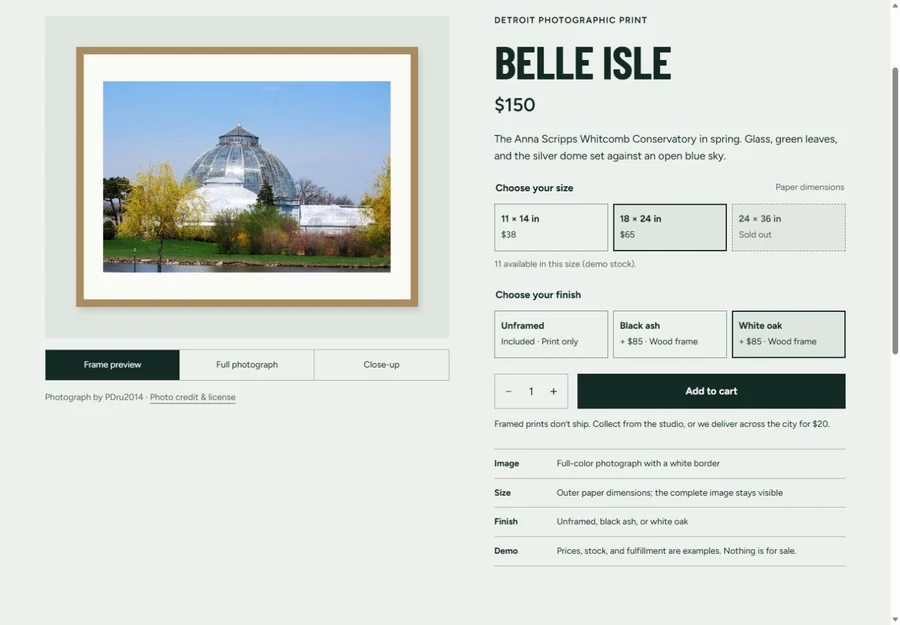
Pallister Press sells nothing in real life, but its Detroit print-store concept demonstrates a complete product-selection path. Neighborhood filters lead into individual print pages. Size and finish choices change the sample price, and the page distinguishes the full photograph from its frame preview and close-up.
Explain the delivery consequence
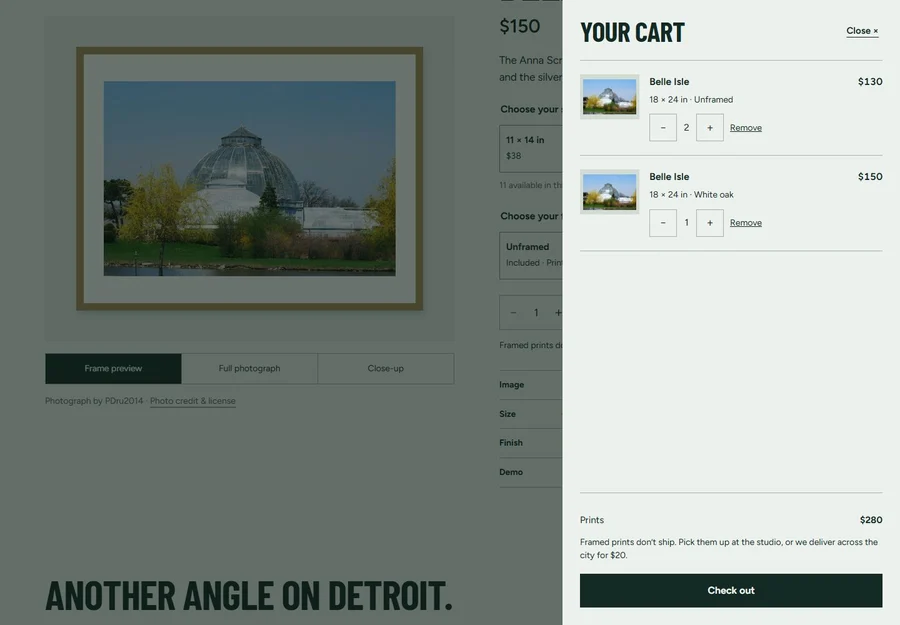
A frame changes more than the appearance of a print. This demo treats framed orders differently from rolled prints when presenting fulfillment options. The cart explains the restriction before checkout. That is the design principle to carry into a real shop: tell people how a choice affects price, availability, and delivery where they make it.
A production store also needs a maintained product catalog, stock rules, fulfillment settings, and an order record. The browser’s displayed total is not a substitute for validating the selected items and calculating the final amount through the store’s trusted checkout system.
Digital products: the purchase needs a delivery path
Help shoppers understand what they receive
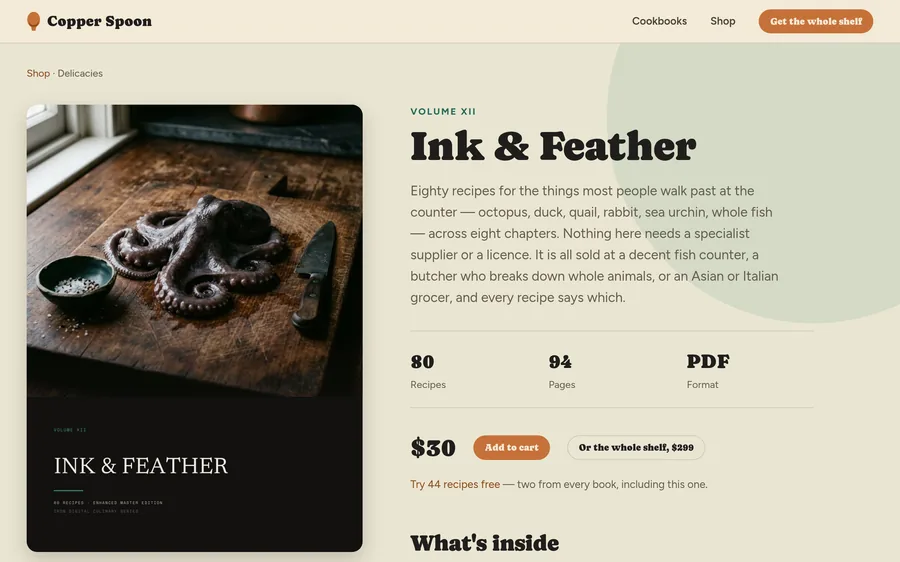
Copper Spoon’s live shop groups downloadable cookbooks by the way people cook. Product pages show the book and its contents, while the catalog explains the PDF format and offers a free sample. The case study describes the cart, bundle pricing, checkout, and download-recovery approach.
For a digital store, the job continues after payment. Customers need to know where the file arrives, which format they bought, and how to recover access if the original message is lost. Those are part of the purchase experience, not a separate support problem.
A real implementation should confirm successful payment before releasing paid files and provide a clear path when delivery fails. Product licenses, file access, refund wording, and support responsibilities belong in the project scope. We do not use the concept demos as evidence of completed orders or revenue.
Pickup orders: the clock is part of the cart
Open Kitchen explores another kind of commerce. Its restaurant concept includes menu-item options, an order ticket, and pickup-time choices. A separate reservation flow lets visitors choose a party size, day, time, and sample table. The ordering and reservation interfaces serve different tasks and should not imply that placing one creates the other.
For a real restaurant, ordering needs current menu availability, preparation time, opening hours, and a reliable destination for the order. A screen that says an order is ready is useful only when that status comes from the actual operation. Open Kitchen’s restaurant identities, availability, order progress, and reservations are simulated.
Scope the store before choosing the platform
- Catalog: products, variants, bundles, images, stock, and who maintains them.
- Fulfillment: shipping, pickup, local delivery, or digital access, including restrictions.
- Checkout: payment provider, final totals, order confirmation, and recovery from failure.
- Operations: order management, receipts, customer support, and updates to existing tools.
An existing commerce platform may already handle much of this. A custom storefront can be scoped around supported commerce services when the shopping experience needs something specific. We review the whole operating process before recommending a build; a custom page does not remove hosting, payment-processing, maintenance, or third-party costs.
Read about custom website design and compare current website packages. Share catalog size and integration needs so the quote reflects the actual store.
Make real products understandable in search
Give each product a useful page with accurate names, descriptions, images, price, and availability. Link to products through ordinary category and collection pages. Keep structured data consistent with what shoppers see. Google describes product markup and Merchant Center data as ways to help it understand eligible products and support richer search appearances; participation does not guarantee a particular result. Read Google’s product-data guidance.
For AI search, keep the same emphasis on accessible, accurate content and useful pages. There is no special AI markup that guarantees inclusion. Google’s AI search guidance explains how its existing search requirements apply. Fictional demo inventory should remain clearly separated from real products offered for sale.
Measure the live store’s product views, cart additions, checkout starts, completed purchases, and delivery problems. Compare the stages to find a specific issue before promising an improvement. More traffic alone cannot tell you whether the product information, price, or checkout is the obstacle.
See the product choices on a phone
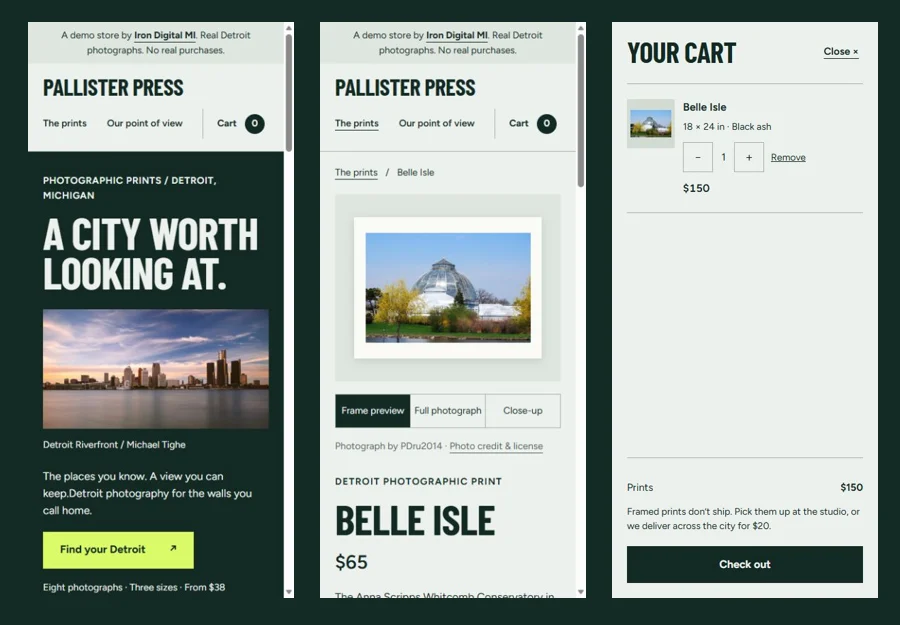
The Pallister Press example carries the same product choices into a narrow screen. Open the demo to inspect the controls and cart directly.
Questions before an ecommerce build
Can one website sell physical products and downloads?
Yes, but the fulfillment paths differ. A physical item needs delivery or pickup information; a download needs access after payment and a way to recover it. We identify mixed-cart behavior, payment handling, and customer messages before building that combination.
Do these demos process payments?
No. Pallister Press and Open Kitchen use simulated transactions. Copper Spoon is a separate live client store. Connecting a demo-style interface to real payments and operations requires a production implementation and testing.
Can better design guarantee more sales?
No. Design can address specific problems in browsing, selection, and checkout, but sales also depend on the offer, price, traffic, availability, and other factors. We use actual store data to assess changes rather than attach an unsupported conversion claim to a redesign.